
EPUB Reader: Organize Books
Upload EPUB books, build your personal cloud library, save notes and bookmarks, discover books through OPDS catalogs, and continue reading from any device without losing your progress.
Loading EPUB tool…
Built for every kind of reader
Everything you need to enjoy EPUB reading
EPUBReadify combines a simplified core layout with powerful backend tools to help you manage your personal cloud library.
Personal Cloud Library
Upload your personal collection of books. Keep all your folders, files, metadata, and reading lists synchronized in a secure database accessible on any device.
Online EPUB Reader
Enjoy a responsive rendering engine built to display standard EPUB files. Adjust typography scale, background theme modes, spacing, margins, and page layouts.
Notes & Highlights
Capture key insights while reading. Save highlighted statements in multiple color codes, write down personal summaries, and export quotes to markdown formats.
Smart Bookmarks
Never lose your place again. The system automatically updates your progress marker down to the exact paragraph, syncing it back to the cloud on page exit.
Reading Statistics
Gather data on your daily progress. Track metrics like total reading sessions, streak milestones, pages turned, and overall platform completion logs.
OPDS Catalog Support
Import free classic publications directly. Integrate public servers like Project Gutenberg or personal servers like Calibre-Web to search and sync titles.
Everything about your reading in one place
Your home dashboard acts as your personal reading command center. Track your current book progress, pick up exactly where you left off, review active highlights, and track your daily streak.
- Immediate access to your active bookshelf
- Reading streaks and daily milestones indicator
- Quick access to recent highlights and bookmarks


Build your own digital bookshelf
Organize your entire book collection. Drag and drop EPUB files to upload, group titles into collections, and search through metadata fields including authors, titles, and publication tags.
- Upload files up to 50MB instantly
- Build unlimited custom lists and collection tags
- Sort and filter by author, progress, or date added
A distraction-free reading experience
Immerse yourself in text. The EPUBReadify e-reader supports adjustable settings to perfectly adapt documents to your custom design and typography preferences.
Custom Typography
Choose from elegant serif and sans-serif fonts to adjust screen legibility.
Adjust Margins
Customize margins, line height, spacing, and page column layouts dynamically.
Reading Themes
Switch between light, warm cream, dark, and midnight screen modes instantly.
Table of Contents
Jump to chapters quickly through our sidebar navigation framework.
Remember every important idea
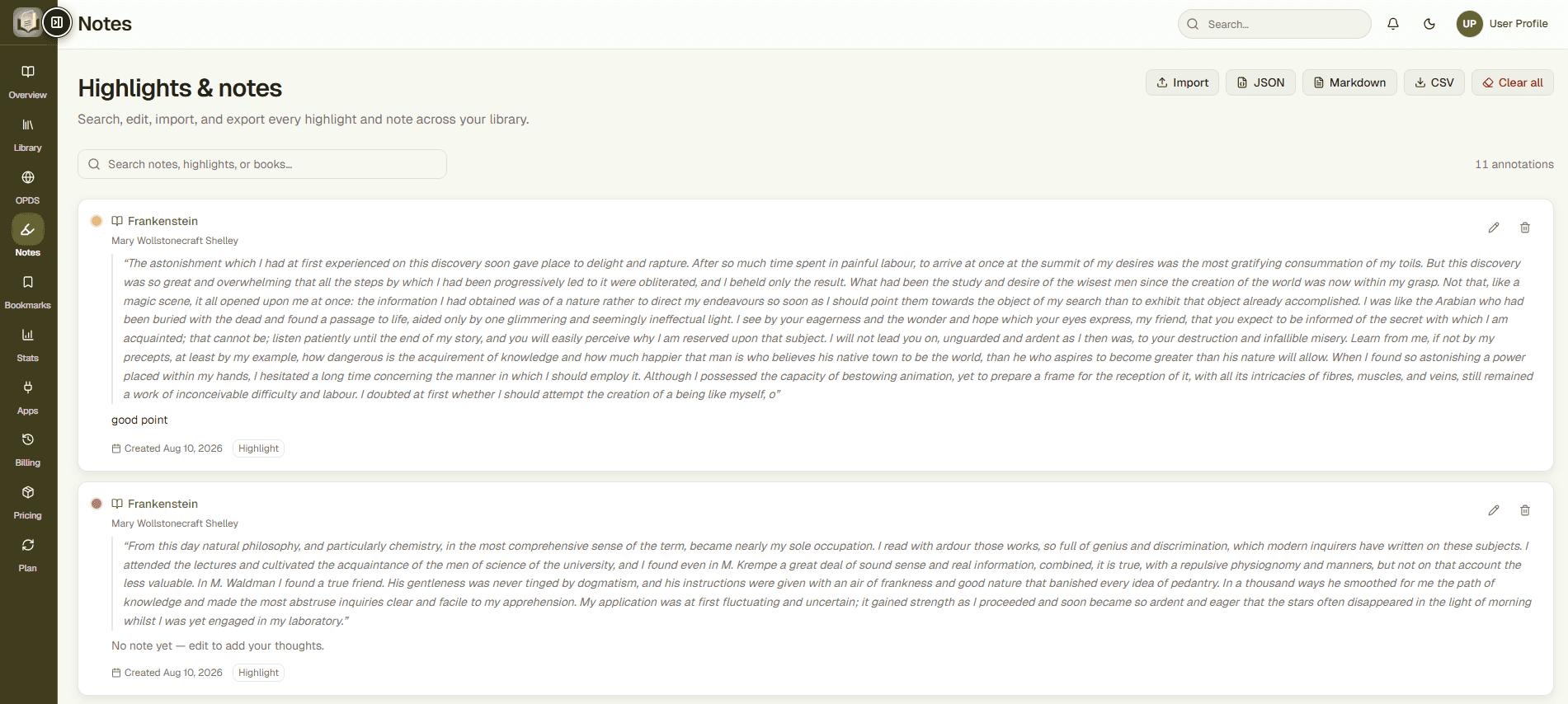
Highlights and bookmarks sync automatically. Review your insights from one place, search through text annotations, and organize comments inside specific book logs.
- Multi-color text highlighting tools
- Export annotations to Markdown or PDF formats
- Instant search lookup through all your notes
12k+
Highlights Saved
98%
Retention Rate
Stay motivated with reading insights
Track your reading progress with dynamic metrics. Visualize your habits, count total sessions, and build daily routines.

Hours Read
Pages Read
Books Opened
Day Streak
Completed Books

Discover books from online catalogs
Import public domain content effortlessly. Sync feeds from sources like Project Gutenberg or personal Calibre-Web architectures.
Connect
Paste the public OPDS catalog endpoint URL into your catalog tab.
Browse
Navigate catalog sections directly from your dashboard.
Import
Download titles into your cloud library with one click.
Fits into your reading workflow
Export and synchronize reading data across platforms to centralize highlights, comments, and book lists.
Readwise Export
Sync reading highlights into your Readwise account.
KOReader Sync
Sync progress between EPUBReadify and KOReader devices.

Why readers choose EPUBReadify
Build your digital library today. Access books, organize folders, and sync notes with ease.
Read Anywhere
Access your cloud library from any web browser, smartphone, tablet, or modern desktop computer.
Organize Everything
Sort files, add tagging metadata, build shelves, and create folders for complete catalog structure.
Continue Anytime
Your paragraph-specific reading marker automatically synchronizes as you navigate through chapters.
Discover More Books
Query catalog systems using default OPDS feeds to discover thousands of free classic public documents.
Track Progress
Review logs detailing total pages, reading hours, and current achievements to monitor progress.
Keep Your Knowledge
Protect book highlights, document annotations, and notes with secure, encrypted daily database backups.
Why readers choose EPUBReadify
See how EPUBReadify upgrades your regular reading environment.
| Feature | EPUBReadify Platform | Basic Offline Reader |
|---|---|---|
| Cloud Library | Yes (Upload & sync all titles) | No (Local storage only) |
| Collections & Tags | Unlimited custom lists & shelves | Basic catalog listing only |
| Notes & Highlights | Integrated with cloud export | Basic local highlights |
| Smart Bookmarks | Paragraph-level automatic sync | Basic single device page mark |
| Statistics Log | Detailed habits, hours, & streaks | No statistical logs |
| OPDS Feeds Connection | Add & search external libraries | No catalog import support |
| Integrations Support | Sync options for KOReader & Readwise | Standalone system only |
| Multi-device Progress | Seamless cross-device cloud sync | No progress synchronization |
Readers love the simplicity
Join thousands of users organizing their learning materials online.
"EPUBReadify has changed the way I organize research papers. I can access highlights instantly and export summaries in markdown format."

Glenn Woodward
Design Engineer"I love the OPDS catalog feature. It makes importing classic literature directly into my cloud library quick and effortless."

Donald Lowell
Academic Researcher"No more manually sending bookmarks across devices. The reading progress tracker is extremely accurate down to the paragraph level."

Alicia Rice
Lifelong Reader"The custom typography and spacing options make reading textbooks on my iPad screen very comfortable for late-night sessions."

Adrian Cole
Medical Student"The integrations with KOReader and Readwise allow me to maintain my personal database cleanly without any extra manual effort."

Daniel Brooks
Software Architect"Building specific collections has helped us organize our online book club syllabus dynamically. Excellent SaaS experience."

Maya Thompson
Club ModeratorLatest Reading Guides
Helpful tips and articles to optimize your daily reading habit.

What Is an EPUB File? Format, Features, and Uses
Learn what an EPUB file is, how it works, why it’s the standard for digital books, and how to open and read EPUBs on any device.
Read More
How to Fix Corrupted EPUB Files: Quickly and Easily
Discover why EPUB files become corrupted, how to repair damaged ebooks, and the best tools to recover your digital library.
Read More
eBooks vs Physical Books: Pros, Cons, and Benefits
Compare digital books and printed books across portability, cost, reading experience, and environmental impact to find your perfect format.
Read MoreFrequently Asked Questions
Clear answers to common questions about using the EPUBReadify SaaS platform.
EPUBReadify is a modern cloud-based reading ecosystem that allows you to upload EPUB books, manage collections, synchronize progress across devices, and take highlighted reading notes online.
Yes. The reader tracks your position down to the specific paragraph you are viewing, automatically updating progress bookmarks to the cloud as you read.
Currently, EPUBReadify works inside modern web browsers. Active pages cache text data locally to prevent interruption, but uploading and complete synchronization require network access.
OPDS (Open Publication Distribution System) is a XML-based catalog format. You paste any catalog feed URL to query, browse metadata, and download free domain publications to your bookshelf directly.
Yes. Highlights and notes can be exported from your dashboard into Markdown (.md) or PDF layouts. Highlights also synchronize automatically with Readwise accounts.
Yes. The platform responsive layout scales perfectly across mobile smartphones, tablets, laptops, and desktop computers.
The free tier supports EPUB files up to 10MB each. Pro users can upload larger files up to 50MB per book.
The institutional Custom plan supports shared shelves. Standard Free and Pro accounts focus on personal private libraries.
We host all files in secure databases with SSL encryption. Daily backups ensure highlights, notes, and collections tags are safely preserved.
You can adjust, pause, or cancel your Pro tier subscription anytime through your dashboard account settings page with zero cancellation penalties.
Start building your digital library today
Upload your EPUB books, organize your library, track reading progress, and enjoy a distraction-free reading experience. Access your bookshelf on any modern device.
No credit card required • Works in every modern browser